


Family Life
3.93.32K Reviews
App Specs
- Version
- 1.51.7
- Updated On
- License
- Free
- Downloads
- 10,000,000+
- Developer
- Supersonic Studios LTD
- Categories
- Arcade
- Platform
- Android, iOS
Screenshots






 Analysis by AppCompare
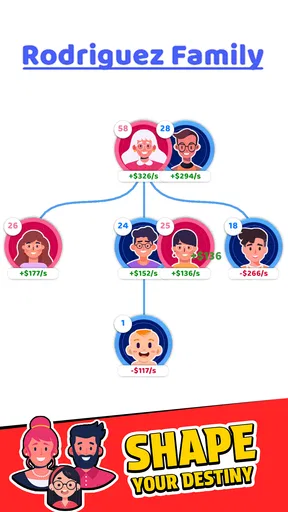
I tend to enjoy arcade games most when they give me a clear next step without demanding a long, uninterrupted session. Family Life is built around that kind of simple forward motion: you move through life events and watch a family take shape over time. The idea is easy to grasp, but what kept me interested was judging each new stretch of play by whether it gave me a reason to continue, rather than expecting a deep simulation.
Small goals make the first sessions easy to enter
The opening appeal is the promise of seeing a family grow through successive events. That gives each short session a natural question to answer: what happens next, and how will the family develop? I found that more inviting than an arcade game that begins with a complicated set of rules or asks me to master precise controls before anything interesting happens. The family-tree theme also gives progress a visible context; it feels less like clearing unrelated rounds and more like moving through a continuing story.
That simplicity has a trade-off. Players who want a detailed life simulator, with extensive control over every character’s choices and routines, may find this approach too light. I would treat it as a casual arcade experience with a family theme, not as a substitute for a management game built around planning every detail. Its best fit is someone who wants an accessible reason to check in, make progress, and stop without needing to remember a complicated strategy.
Progress is most satisfying when it has context
In a game centered on a growing family tree, progress matters most when I can connect a new milestone to the journey that came before it. That framing is a useful reason to pay attention to the sequence of events instead of tapping through everything automatically. If you are playing in brief bursts, pausing to notice what has changed can make a small amount of progress feel more meaningful than simply chasing the next screen.
My practical tip is to decide what you want from a session before you start. If you have only a few minutes, focus on advancing one step and then stop when that goal is reached; if you have more time, continue while the events still feel fresh. This avoids turning a relaxed arcade game into a routine you feel obliged to maintain. It also helps answer a common question: the game is easiest to enjoy when you treat progress as a series of short visits rather than a project that needs constant attention.
The challenge works best for casual play
Family Life’s appeal depends on keeping its event-by-event progression approachable. I would not come to it expecting the sharp reflex tests of a demanding arcade game or the layered decision-making of a strategy title. Instead, its pacing is better suited to players who like the feeling of moving forward without having to study a complicated system. That is a genuine strength for a quick break, though it may also leave experienced arcade fans wanting more demanding play.
For a fair test, I would give it a few short sessions rather than judging it from a single glance. A theme can make an early sequence appealing, but the longer-term question is whether the next life event still feels like a worthwhile reason to return. If you find yourself continuing because you are curious about the family’s next stage, the loop is doing its job. If you are looking for difficult mastery or substantial tactical control, that same uncomplicated pace may feel too gentle.
Worth Reading Before You Choose

EA SPORTS FC Mobile 26 Is a Bigger Football Game, but It Takes Time

Flipboard Shows What News Apps Must Do Beyond the Feed

Switching to Android Auto Means Rethinking Your Driving Routine

Google Calendar Makes a Crowded Week Easier to Manage

Ludo King Makes the Most of the Minutes Between Plans

Baby Panda World Brings Quick Play to Modern Phones, but Its Game Library Feels Busy
Progression should invite, not pressure
Casual progression can be relaxing, but it can also become repetitive if the desire to unlock what comes next is doing all the work. I prefer to keep that distinction in mind here: curiosity about the family’s development is a satisfying motivation, while playing only to avoid feeling behind is not. You do not need to turn every idle moment into a session. Let the game earn your attention by making the next stretch enjoyable, rather than treating regular play as an obligation.
That is also the main trade-off I would explain to a friend. If you like visible forward movement and a light theme, the family-tree framing gives the arcade format a more personal thread. If you need a strong competitive challenge, a rich cast of systems to optimize, or a story you can shape in fine detail, a different kind of game will likely suit you better. Family Life is most comfortable as an easygoing diversion, not as a demanding hobby.
So, I recently got my hands on the Family Life app, and let me tell you, it’s a game-changer! If you’re juggling multiple schedules, trying to keep everyone in the loop, or just looking to streamline your family’s daily routines, this app might just become your new best friend.
Getting Started with Family Life
First things first, setting up Family Life is a breeze. After downloading the app, which is available for both Android and iOS, you’ll be greeted with a clean and intuitive interface. It's like the developers knew exactly what we needed—a straightforward way to manage family chaos without adding more stress.
Features That Make Life Easier
Now, let’s dive into the features. One of the standout elements is the shared calendar. You can easily add events, appointments, and reminders, and the best part is everyone in the family can view and edit it. No more "I didn’t know we had soccer practice today!" moments. It’s all right there, color-coded and organized.
Another fantastic feature is the task list. You can assign chores or tasks to family members, set deadlines, and even send gentle nudges if someone’s dragging their feet. It's a subtle way of maintaining order without turning into the household drill sergeant!
Communication Made Simple
Family Life also excels in the communication department. It has a built-in chat feature that keeps conversations streamlined. Whether you’re planning a family outing or just checking in on everyone’s day, it’s all centralized. Plus, you can create group chats or send direct messages, making it super easy to stay connected.
One feature I particularly love is the location sharing. It’s not about keeping tabs on everyone, but more about ensuring safety and convenience. Knowing when someone’s on their way home or at their destination adds a layer of peace of mind that’s hard to beat.
Customization and Personalization
You’re not stuck with a one-size-fits-all approach either. The app allows for a good degree of customization. You can personalize notification settings, choose themes that suit your style, and even set up profiles for each family member, complete with photos and personalized icons. It’s these little touches that make the app feel more like a part of the family.
Some Final Thoughts
Overall, I’m genuinely impressed with Family Life. It’s not just an app; it’s a tool that helps families stay organized, connected, and efficient. Whether you have a large family with jam-packed schedules or a smaller unit looking to tighten communication, this app has something for everyone.
So, if you’re ready to turn your household into a well-oiled machine, give Family Life a try. It just might save your sanity, one organized day at a time!
Who will get the most out of it
I would recommend it first to people who enjoy compact arcade sessions and like having a theme to follow between rounds. It can also work for a casual player who wants a gentle game to dip into while waiting for a ride or taking a short break. The family theme gives the progression a warmer frame than a score-chasing arcade title, but the appeal still depends on enjoying the game’s straightforward rhythm.
It is less suited to anyone shopping for an actual family organizer. Despite the name and the original app-focused description above, the product is a game, not a shared calendar or household communication tool. I would not download it to coordinate appointments, assign chores, message relatives, or share someone’s location. That distinction matters: the real draw is play and progression, not solving practical scheduling problems.
A realistic way to fit it into a day
On a commute or during a quiet break, I would open it with one modest goal in mind: see what the next stretch of family events brings, then put the phone away when I have had enough. That approach makes the game easy to fit around other plans and keeps its casual pacing from becoming a demand. It also gives me a useful test of whether the progression is working for me: after closing the game, am I genuinely curious to return, or am I only thinking about a task left unfinished?
For younger players, the Teen age rating is worth checking before handing over a device, especially if the phone is shared. Adults choosing a game for a child should consider that rating alongside the child’s age and preferences rather than assuming that a family-centered theme automatically makes it appropriate for everyone.
How it differs from other arcade choices
Many arcade games put the emphasis on fast reactions, high scores, or repeating a compact challenge until you improve. Family Life leans instead on the appeal of seeing events unfold and building a continuing family story. That makes it an easier recommendation for someone who finds score-focused play stressful or a little empty, but a weaker match for players who want precise skill tests, direct competition, or a deep set of mechanics to master.
Compared with a full life-simulation or management game, it is also a lighter commitment. I would choose a more detailed simulator if I wanted extensive control and complex planning; I would choose a conventional arcade game if I wanted immediate action. Family Life sits between those expectations, offering an accessible progression hook without making it the right choice for every kind of player.
Practical expectations before installing
The game is free to install, and Supersonic Studios LTD is the developer. It has a 4.0 average from around 240,000 ratings, with more than 10 million installs and roughly 3,200 written reviews. Those figures suggest that it has reached a broad audience, but they cannot tell you whether its particular pace and theme will click for you. I would use them as context, not as a substitute for deciding what kind of arcade play you actually enjoy.
It is rated Teen, runs on Android 7.0 or later, and version 1.51.7 is the current version. Optional in-app purchases range from $0.99 to $39.99 per item, so I would check purchase prompts carefully if I were setting it up on a device used by a child or anyone who should not make purchases. A free starting point is welcome, but the range makes it sensible to keep spending controls in mind rather than treating every optional offer as necessary to enjoy the game.
One useful way to judge its value is to separate curiosity from pressure. If the next family event gives you a pleasant reason to return, the progression is earning its place on your phone. If you feel pushed to keep going despite no longer enjoying the session, it is fine to take a break or choose a game whose challenge better matches your taste. I would not recommend it to someone who needs a demanding skill ceiling or a carefully managed simulation; I would recommend trying it to a casual player drawn to a simple, ongoing family-themed arcade journey.
Pros
- User-friendly interface for all ages.
- Comprehensive family management tools.
- Real-time location tracking feature.
- Customizable notifications and reminders.
- Supports multiple devices seamlessly.
Cons
- Limited free version features.
- Occasional sync delays reported.
- Some features require premium subscription.
- Battery consumption can be high.
- Privacy concerns with location tracking.
FAQs for Family Life
What is Family Life and how does it work?
Family Life is a comprehensive app designed to help families manage their daily activities, schedules, and communication. The app offers features such as shared calendars, task lists, and messaging to ensure everyone is on the same page. It allows for seamless collaboration and organization within family units, making it easier to coordinate plans and responsibilities.
Is Family Life available for both Android and iOS?
Yes, Family Life is available on both Android and iOS platforms. You can download it from the Google Play Store for Android devices and the Apple App Store for iOS devices. This cross-platform availability ensures all family members, regardless of their device preference, can access and use the app effectively.
Does Family Life support multiple user profiles?
Absolutely. Family Life allows each family member to have their own user profile. This feature is essential for managing individual schedules and tasks while still keeping everything synced within a single family account. Profiles can be customized with specific permissions and settings to suit each member's needs.
What privacy features does Family Life offer?
Family Life prioritizes user privacy by implementing robust security measures. The app uses encryption to protect personal data and allows users to customize privacy settings. You can control who sees what information, ensuring that sensitive details remain confidential within the family group.
Is there a cost associated with using Family Life?
Family Life offers a free version with basic features, but there is also a premium subscription available. The premium version includes additional features such as advanced planning tools, larger storage for shared media, and ad-free usage. This subscription is optional and caters to families who need more comprehensive tools.


